Track project and order times on your smartphone
The world of work is more mobile than ever. Project and order times no longer arise solely at a desk. They arise on the building site, out in the field, at the customer or in the home office. That is exactly why more and more companies opt for time tracking on their smartphone. The mobile phone is almost always within reach and makes it possible to record project and order times directly.
With order time tracking, handwritten timesheets, forgotten project times and after-the-fact estimates are a thing of the past. Instead, the start and end of an activity are documented directly on site, or on the go, per customer, project and order. That saves time, reduces transfer errors and ensures transparent documentation of the project and order times worked.
Why does time tracking on a smartphone make sense?
Anyone who notes their project and order times only in the evening, or even at the end of the week, often forgets individual tasks or estimates times inaccurately. That not only leads to incomplete records but also makes the follow-up costing of projects and orders harder.
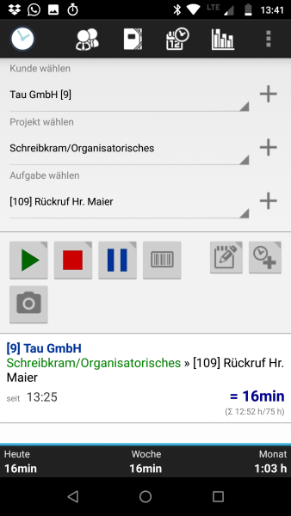
With a job time-tracking app on the smartphone, project and order times can be captured immediately. A single tap is enough to start or stop the timer. Customers, projects and tasks can be selected directly. This produces complete, verifiable time records that can be used both for project planning and for later invoicing.
Small companies, tradespeople, freelancers and service providers benefit in particular, because no additional devices or terminals are needed. The smartphone is already there and accompanies employees throughout the entire working day.
Where can project and order times be tracked on the go?
Modern project and order time tracking does not stop at the office door. It accompanies the working day everywhere that services are delivered.
Typical areas of use are:
- Building sites
- Customer appointments
- Maintenance and service jobs
- Assembly work
- Field service
- Home office
- Travel
- Project meetings
Especially on the move, quick and simple operation is essential. The start and end of an activity should be documentable per order with just a few taps. Equally helpful is the option to attach notes, photos or further information directly to the respective project or order.
Working offline functions independently of the mobile network
A stable internet connection is not available everywhere. On building sites, in basements, industrial halls or rural regions, reception can be limited.
That is why a good job time-tracking app should also work reliably without an internet connection.
The project and order times are stored directly on the smartphone and can be synchronised later, as soon as a connection is available again. This keeps time tracking ready to use at any time. It works independently of the mobile network.
Cloud or local data storage?
Many job time-tracking apps automatically store all data in a cloud. That is convenient for some companies, but others prefer a solution in which they keep control of their data themselves.
With local data storage, project times, orders and customer data initially remain directly on the smartphone. Only when the user explicitly wishes are the data synchronised or transferred to their own computer.
Companies with high data-protection requirements or sensitive customer data in particular value this independence from external cloud services.
Which companies is mobile project and order time tracking suitable for?
Time tracking on a smartphone is generally suitable for all companies that capture project and order times and whose employees are not permanently based at a fixed workplace.
These include, among others:
- Tradespeople
- Electricians
- Plumbers
- Painters
- Landscapers
- Surveyors
- Architects
- Engineering firms
- IT service providers
- Consultants
- Freelancers
- Service technicians
- Field staff
Smaller companies also benefit from simple mobile time tracking, because no elaborate infrastructure is required and it can be introduced quickly.
What should you look for in a job time-tracking app?
Not every app offers the same range of features. Before deciding, it is worth taking a close look at the most important criteria.
A good solution should:
- capture project and order times easily
- manage projects and tasks
- work offline
- offer intuitive operation
- support notes and photos
- take data protection seriously
- receive regular updates
- offer reliable support
- be able to create reports or timesheets
- synchronise with desktop software when needed
The simpler the operation, the higher the acceptance among users.
Time tracking with Xpert-Timer mobile
Xpert-Timer mobile was developed specifically for companies that want to record their project and order times directly on the smartphone.
The app works even without an internet connection. The captured project and order times, along with customers, projects and tasks, are stored locally on the Android device. This keeps you in control of your data at all times and lets you decide yourself whether and when synchronisation takes place.
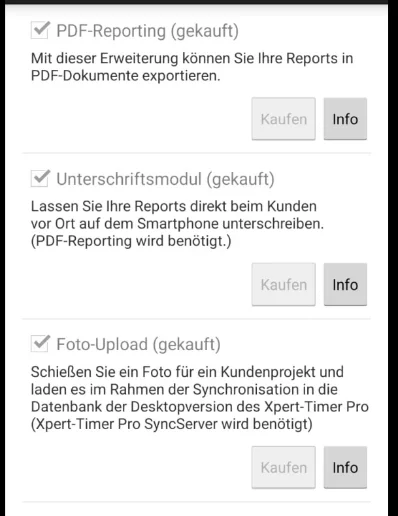
Add-on modules such as PDF report printing, signatures or photos enable seamless documentation of your work. For companies that already use Xpert-Timer Pro, the times recorded on the go can be conveniently synchronised with the desktop system.
Xpert-Timer mobile is a complete solution for mobile project and order time tracking. It is independent, flexible and works without a forced cloud.